Ask your AI for a discount code. Your cause gets paid.
Add Promo Magpie to ChatGPT, Claude, Gemini, Perplexity, Grok or Le Chat and just ask. You get our live codes, straight from the stores, and 50 % of our commission goes to the charity, club or school you pick. Free, with no account.
Hi! What are you shopping for? I'll find our best live codes.
Pick a cause first, and every link supports it. Odaberi svrhu
312shops
312live codes and deals
6causes to support
43countries
Live codes, checkedFrom the stores and their official programmes, with when each was last checked. Expired ones come down.
Your cause gets 50 %Pick a charity, club or school the first time. Every link it gives you supports it, and you can ask how much it's raised.
Answers in your languageAsk the way you talk, in any language. It plans a whole shop, compares codes and finds student and key worker deals.
Your chats stay yoursWe only see what the assistant searches our codes for, never your conversation.
Add it in a minute
ChatGPT
1
Open Plugins
In ChatGPT, open Settings › Plugins.
2
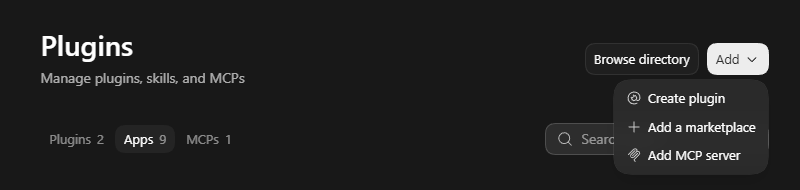
Add an MCP server
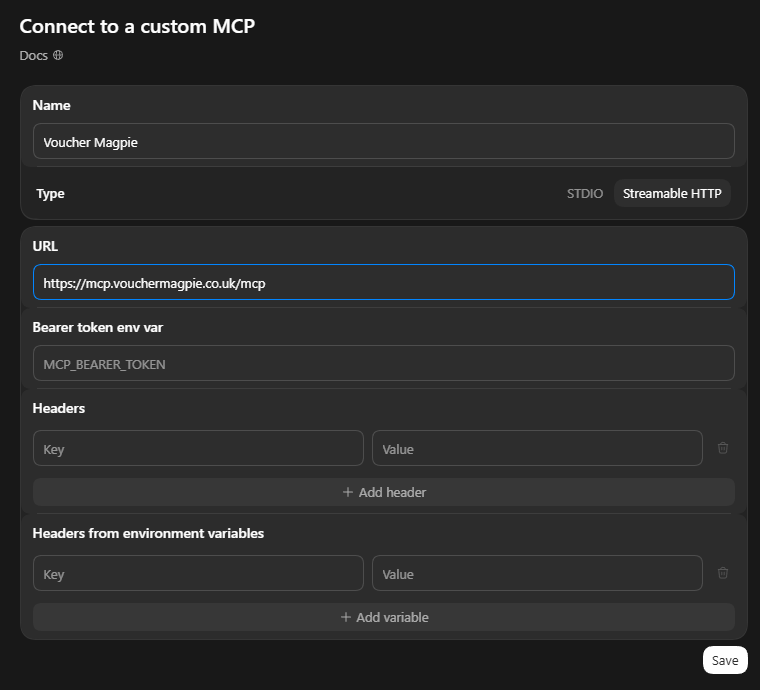
Click Add › Add MCP server, name it Promo Magpie, choose Streamable HTTP and paste our server address as the URL. Leave the token and headers empty, and save.
3
Check it is on
Under MCPs, make sure Promo Magpie is switched on.
4
Ask for a code
In a new chat, ask for a code or a deal, and pick your cause when it asks.
What you'll see
Step 1Step 2
Don't see Plugins? Older versions of ChatGPT have it under Settings › Apps › Advanced settings: turn on Developer mode, then Create app with our server address and No authentication.
Claude
1
Open Connectors
In Claude, open Settings › Connectors.
2
Add a custom connector
Click Add custom connector, name it Promo Magpie and paste our server address.
3
Switch it on
In a chat, open the tools menu and turn Promo Magpie on.
4
Ask for a code
Ask for a code or a deal, and pick your cause when it asks.
Gemini
1
Open Connected apps
On gemini.google.com, open Settings › Connected apps.
2
Add a custom app
Choose Add a custom app, paste our server address and click Next.
3
Ask for a code
It works in the Gemini app on your phone too. Ask for a code and pick your cause.
Google is bringing custom apps to Gemini gradually, starting with personal accounts in the US. Not there yet? The free Gemini CLI on a computer takes us now: add this to .gemini/settings.json in your home folder.
Ask for a code or a deal, and pick your cause when it asks.
Not yet:Microsoft CopilotMeta AITheir consumer apps can't add servers like ours yet. We'll add them here when they can.
See it in 24 seconds
Add it once, ask for a code, pick your cause the first time. After that, every code it finds supports it.
Primjer
Better than hunting for codes
Searching code sites
Pages of codes that expired months ago
Made-up "up to 90% off" deals
Pop-ups, ads and trackers
Nothing for any good cause
Asking with Promo Magpie
Live codes from the stores themselves, checked
Each with its terms and when it was last checked
Right where you already ask questions
50 % of our commission to the cause you pick
Things to ask
Tap one to copy it, then paste it into your assistant.
Shopping in Hrvatska? Say so in your chat, and it uses our Hrvatska codes, stores and causes.
Pitanja
Does it cost anything?
No. It's free to add and free to use. Stores pay us a commission when you buy through our links, and we give 50 % of it to your cause. Your price stays the same.
Will it remember my charity?
It asks which cause you'd like to support the first time. If your assistant's memory is on, it remembers your cause for next time; you can change it whenever you like.
Which countries does it cover?
All of ours: the UK on Voucher Magpie, and the USA and 40 more countries on Promo Magpie. Tell it where you shop.
What does it share with you?
Only what the assistant asks our server for: the shop or product it's searching, your country and the cause you picked. Never your chat, your name or your email.
Do the codes always work?
We check them and take expired ones down, but a store can end a code at any time. Each one says when we last checked it.
Is it safe to add?
Yes. It can only read our public codes, stores and causes. It can't see your files or accounts, buy anything or change anything.
Make your next shop count
Copy our server address, add it to your assistant, and ask for a code.
Odaberi udrugu ili klub koji želiš podržati · dajemo 50 % naše provizije, bez troška za tebeOdaberi
Kupuješ zaPodržavaštvoju svrhu · 50 % naše provizije ide njima, bez troška za tebe · 50 % njimaPromijeni
Koristimo kolačiće kako bi stranica radila i zapamtila udrugu ili klub koji odabereš te kolačiće Google Analyticsa za brojanje posjeta kako bismo je poboljšali. Bez kolačića za oglašavanje.










































 ChatGPT
 Claude
 Gemini
 Perplexity
 Grok+ more

 Le Chat
 Other apps
 Microsoft Copilot
 Meta AITheir consumer apps can't add servers like ours yet. We'll add them here when they can.